Turning My iPhone Into The Perfect Dumbphone
It shouldn’t cost anything to use your phone less.
In early 2026, after years of experimentation, I published the solution I wished existed for fixing digital overconsumption.
I had the following goals in mind:
- Create a really effective solution to doomscrolling
- Make it free and open-source
- Prevent doomscrolling on a second device (laptop, second phone)
- Use technology when I need it, for as long as I need it
The last point, I think, is the most important. The actual goal for me, and for many others I talked to, was simple:
“I want a healthy relationship with tech. I want to use tech for what I need and when I need it.”
Everything else is just the means: dumbphones, distractions, app blockers, whatever else. The goal is the same. Use tech with purpose.
With Normal, I believe I’ve created this for myself and opened the door for many other users.
The cool thing about this solution is that you dumb down a smartphone, which gives you much more flexibility than trying to make a dumbphone fit your smart needs.
Below, I go through my journey and design choices.
Now, while I do believe I’ve met the goals above, this solution may not be for everyone. Here’s a chart outlining my recommendations for quitting your doomscrolling habit, at least on your phone.
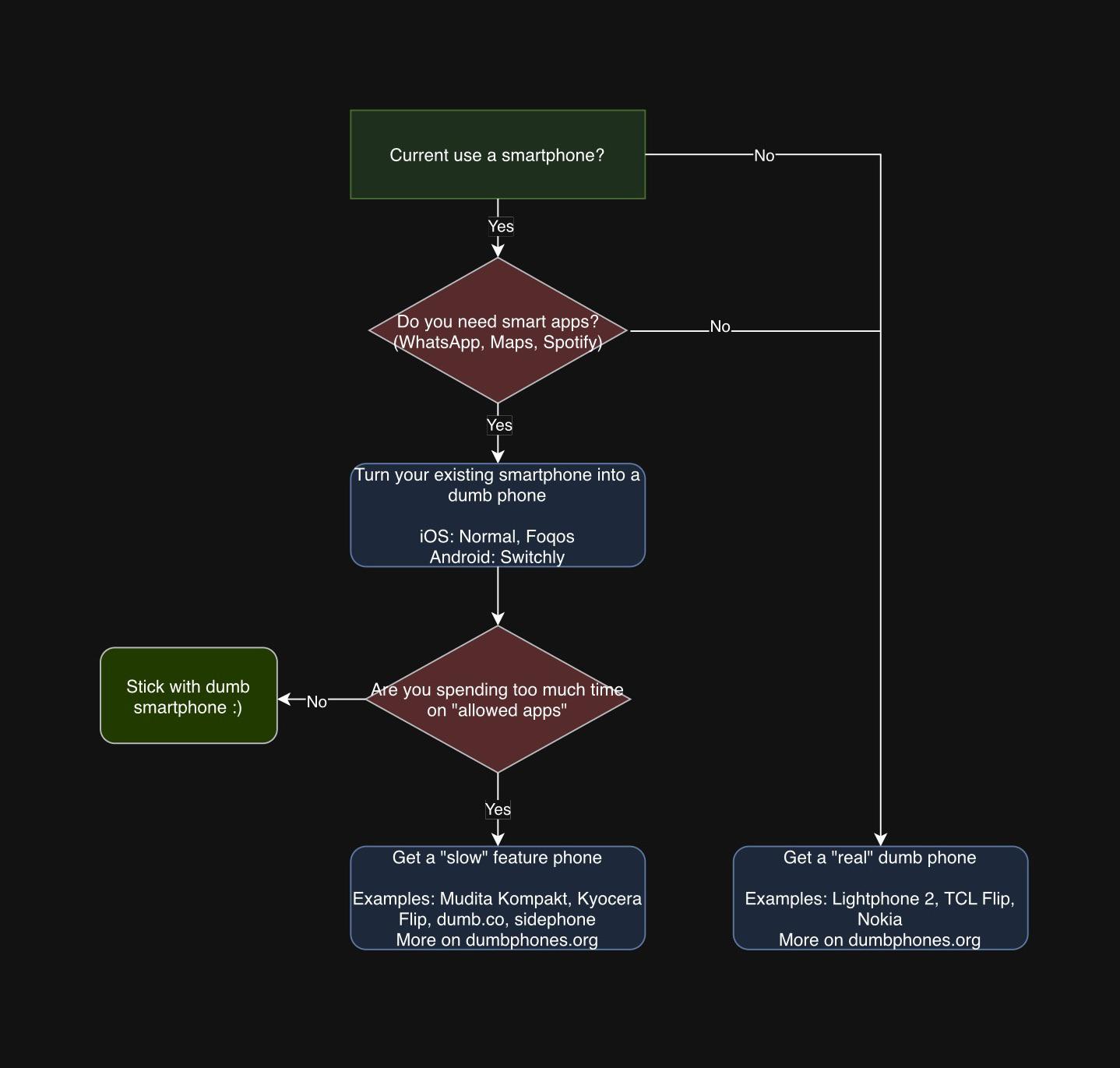
Background
In 2020, my screen time was reaching 12 hours on some days, and my weekly average was in the double digits. This wasn’t isolated to COVID either. I grew up with social media. Throughout high school, I’d stay up well into the A.M., watching YouTube or scrolling. In 2021, as COVID wound down, my habits stuck.
I knew I wasn’t alone. I knew this because I started reading about digital minimalism, saw people ditching their phones for flip phones, and saw ads for app blockers with hundreds of thousands of followers. Even back then, there was a thriving community of people trying to control their digital habits.
Over the next couple of years, I experimented with everything:
- Apple’s Screen Time
- Apps like Opal, ScreenZen and OneSec (I paid for the premium plans too)
- Researching how to prevent bypassing (which is super easy for any iOS app blocker)
- Smaller iPhones and smaller Android phones
The issue with most app blockers was that you eventually start making unblocking super easy. They’re usually just slightly hardened versions of Apple’s Screen Time. Also they can usually be turned off in settings easily (which can be fixed though, as I learned).
The other issue is that a lot of these apps have millions of dollars in advertising budgets and costly subscriptions. I believe many of them care more about selling you a solution that looks like it works (and putting the blame on the user’s willpower) than about actually working.
Then I tried dumbphones. After hours of research, I landed on the Kyocera 902KC. This was a GREAT device. I was using social media less. The numpad was a pain to text on, so I was spending less time on frivolous texting. And it even had sideloadable smart apps, so I could still use apps for work, music streaming, etc.
Why I didn’t stick with a traditional dumbphone
Dumbphones work for many people. A dumbphone you can sideload apps onto will probably work for most people.
But it didn’t work for me for a few reasons:
- iMessage/FaceTime/Find My: Apple’s walled garden had me. These were the main forms of communication in my circles (outside of social media).
- Other apps required a lot of tinkering to get working, and some never did.
- I still kept a second phone for work apps.
- Connectivity issues, especially while travelling.
- I started doomscrolling on my laptop more and more.
The last one was a big issue.
The issue with second devices
My habits just transferred from my phone to my laptop. Now, the laptop does have the advantage that it’s not always in your pocket. But being at home, I still didn’t have the relationship with technology I wanted.
The underlying issue was that I still needed to get real work done, and my laptop had unlimited access to the web. Plenty of times, the work I needed to do was on distracting sites, and my phone didn’t have access to them anymore. So the laptop was my only option. I needed to study with YouTube. I needed to check plans on Instagram. I needed to check my email. I just didn’t need to check it 10x an hour.
This caused me to block websites on my laptop and use a second phone (the smartphone I’d “quit”) for distracting apps.
The second-phone setup was a bit better. My main phone (the Kyocera 902KC flip phone) and laptop were now distraction-free.
But nothing was stopping me from installing Instagram and doomscrolling on my second phone. The second phone would often start far away, then slowly make its way back into my room. I’d justify it: “I just need to check an email, a message, or the status of my latest video.” Even if I just had work apps, like email and banking, I’d just keep checking and refreshing those.
And more often than not, an email check on my second phone would turn into TikTok getting reinstalled and a binge session.
Enter hardware blockers
Eventually, I shifted back to my iPhone, trying out the different app blockers yet again. The goal was one device, with limited use of smart apps. My laptop still had everything blocked.
In 2024, I got an ad for Brick. At this point, I was willing to try everything. I didn’t care that it was $60 for an NFC tag. If it worked, I’d be willing to pay 10x that.
And it did work, for the most part. Out of all the solutions I’d tried, this was the best one yet.
I got the best of both worlds: my iPhone was bricked, so it was pretty much a dumbphone. If I needed a smart app, I’d have to physically get up and tap my phone on the Brick. It was often too much work to even consider.
- My laptop could stay blocked too.
- All my devices were distraction-free.
- If I really needed it, it was just a tap away.
But then gaps started showing up.
The issue with Brick
My main issue with Brick was that it wouldn’t automatically reblock. If I unblocked, I’d have to manually reblock, and sometimes I’d go weeks without reblocking. Other issues showed up too:
- No auto-reblock; requires willpower to reblock
- No app-specific unblock. What if I just want email? I had to unblock everything
- Due to a combination of the above, I’d spend hours doomscrolling after unblocking
- Easy to move the Brick; I often found myself moving it to my bedroom
- $60 for an NFC tag
From 2024 to 2026, I raised these issues with Brick. After years of waiting for these gaps to get fixed, I wanted to make my own solution. Hardware blockers like Brick, Bloom and Blok are so close. But they all have similar gaps.
Normal
In late 2025, I began working on Normal. I actually did it because I forgot my Brick while travelling. And I’d reached out to Brick multiple times hoping to atleast get timed unblocks, fixing the biggest gap in Brick. So was natural to atleast try myself.
I wanted to make something that works, has no gaps, and is completely free: no ads, no data tracking, no subscriptions, no paywalls, no sign-ups. All free, open-source and private.
Getting the main functionality working was actually super simple. Apple exposes a Screen Time API that’s pretty decent to work with. I had an app working with any NFC tag pretty easily.
Now, to address the gaps.
1. Auto-reblock. In Normal, when you unblock, you unblock for a set time. You can preset this time.
2. App-specific unblocks. Want to unblock an app or a set of apps only? Create a group, then unblock that group.
This was actually super difficult to implement, since Apple randomizes the UUID in their app picker each time it opens. I had to use a workaround, and surprisingly, people actually liked its UX: you select a main App List, then manage subsets of it for schedules and groups.
The issue with this workaround is that reselections in the main App Select list require reselections in groups and schedules as well.
3. Free and open source. Use any NFC tag, QR code, barcode or location.
Not being tied to a $60 Brick was a huge win beyond the cost savings for users. This opened up so many cool use cases. For example, I use Location unblock now as my main unblock method over NFC tags. This also solves gaming the NFC tag by bringing it closer.
A user told me they use a barcode of a popular candy they don’t like. If they’re out and need to get unblocked, they can just pop by a convenience store and scan that.
Outside of these gaps, there’s a bunch of other features some of the main ones:
- Specific unblock methods for specific apps/groups
- Max daily limits
- Schedules
Normal works because it’s strict: it forces you to only use your phone when you need it, for as long as you need it.
My current set-up is as follows:
- All apps that don’t get me towards my goals are deleted
- Distracting apps I need sometimes are blocked via Normal
- My main key is a location key, a park 10min walk away (If I want full access to my phone the only way is to go to the park).
- The App Store and Safari are blocked, always.
- Apps I sometimes need (email) are on a schedule unblock and have a second unblock NFC.
- My homepage is just one page.
- I use password-locker to lock Screen Time settings
Essentially my phone is dumb except for when I check email. Which I can only do on schedule or for 15min if I use my NFC key.
Gaps in Normal
Now, while Normal is perfect for me, I can acknowledge its gaps.
- Requires setup, and willpower to make the setup effective.
- Allowed apps (like texting), can still be distracting, for users that have trouble here, refer to my chart above.